
Ever looked at a static image and thought, "This needs more vectors"? If you’re the type of person who finds beauty in the smooth interpolation of a Bézier curve, then standard mobile video editors have likely left you feeling... geometrically unfulfilled. Enter CapCut.
While many see it as a "social media app," those of us with a penchant for precision know it as a pocket-sized powerhouse for spatial manipulation. Today, we’re diving into the logic of Keyframing—the fundamental building block of non-linear animation.
The Logic of the Keyframe
In classical animation, "key" frames are the primary positions that define a movement. The computer then calculates the "in-betweens" through a process called interpolation.
In CapCut, the diamond icon is your best friend. It allows you to plot coordinates $(x, y)$ for position, scale ($s$), and rotation ($theta$). By setting two points on the timeline, CapCut executes a linear transition between those states.
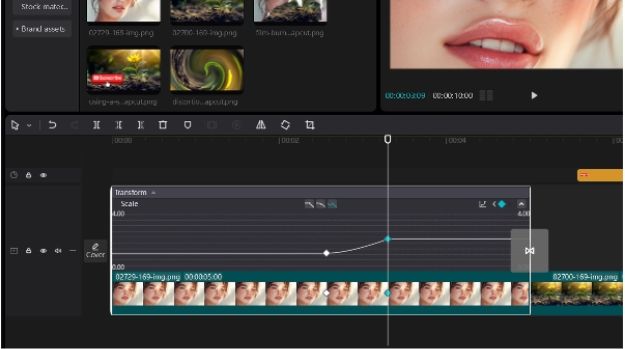
The Pro Tutorial: The "Cinematic Zoom-In"
1. Plot the Origin: Place your playhead at the start of a clip. Tap the diamond icon. This locks the current parameters.
2. Define the Vector: Move 2 seconds forward. Use two fingers to zoom in on your subject. CapCut automatically drops a second keyframe.
3. The Result: You’ve just programmed a linear zoom.
4. Nerdy Tip: Want to avoid the "robotic" look? Look for the Graphs tool after setting your keyframes. This allows you to apply "Ease-In" or "Ease-Out" functions, mimicking the physics of inertia and momentum.
Why CapCut?
It’s about Computational Efficiency. CapCut’s engine renders these transformations in real-time, even on high-bitrate 4K footage. You aren't just making a "TikTok"; you're orchestrating a series of visual algorithms that look buttery smooth.
Ready to calculate your next masterpiece?
Download CapCut for Desktop or Mobile Here and start plotting your vectors
Media Contact
Company Name: ByteDance
Email: Send Email
City: Beijing
Country: China
Website: https://www.capcut.com